AffiliateCore: top up your balance and withdraw funds
How advertisers add funds and publishers withdraw USDT TRC-20: real DEMO screenshots, limits, statuses and worked examples.

This guide shows where to go, what to check before confirming, and how to interpret the result. Advertisers add funds to pay for activity under their offers; publishers withdraw rewards that are already available. These are separate balances and actions. A publisher does not need to fund an advertiser balance to receive a payout.
The workflow and settings were checked on 10 October 2026. The screenshots come from real, isolated AffiliateCore DEMO dashboards with empty transaction histories. Payments are disabled in DEMO; this does not mean payments are unavailable on the live site. Numerical examples are educational, not actual customer transactions.
How to top up an advertiser balance
- Sign in as an advertiser and select your project. The section is currently called “Company balance”, including for individuals. Its name does not make a company a registration requirement.
- Open “Work → Company balance” or the “Top up” link in the balance panel. Funding is available to the project owner and a user with the finance role. If the section is missing, check your role with the owner or support. Another advertiser's direct link does not grant access.
- Select “Top up” and enter an amount in USD. On the verification date, the platform form accepts 1–100,000 USD with up to two decimal places. These are platform form limits; a payment method may have additional limits.
- Confirming the form opens the PRMoney payment page. Before paying, check the amount, currency, available method, fee and final charge. Use only a method offered in your checkout. An integration does not imply that every card, bank or country is supported.
- Follow the payment page instructions and keep the receipt and transaction reference. Do not transfer funds to details shown in screenshots or supplied by unknown senders. Do not create a second payment before establishing the first payment's outcome.
- Return to “Company balance”. Check the top-up history, transaction status and balance change. Returning from checkout alone does not confirm credit: the platform must verify the payment result.
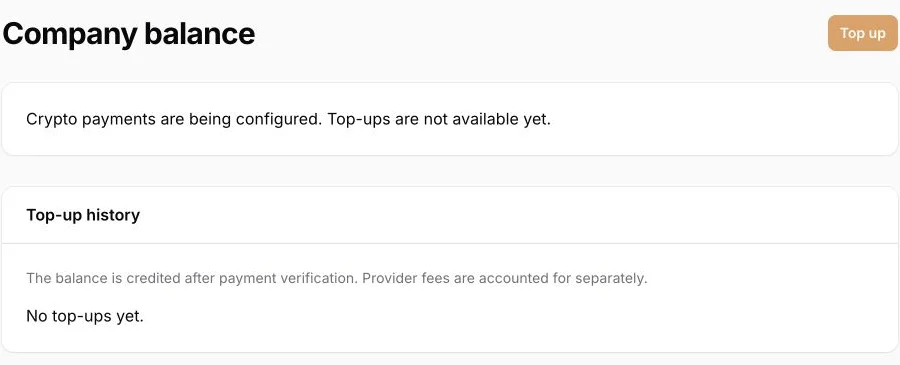
Real DEMO interface, 10 October 2026. The button is inactive because payments are disabled in DEMO. Select the image to enlarge it.
Amount, fees and credit
The dashboard balance is denominated in USD. Distinguish the requested top-up, the final charge to the payer, and provider or bank fees. A funding fee is not the same as conversion pricing or the platform markup. Check “Platform terms” and the individual offer for the applicable commercial terms. This guide does not set a fixed payment fee or exchange rate.
Educational example: your balance is 50 USD. You create a 100 USD top-up, and the platform confirms that 100 USD has been credited. With no other debits or credits, the new balance is 150 USD: 50 + 100 = 150. This does not promise a charge of exactly 100 in your card's currency: the final charge depends on the displayed payment and conversion terms. If the balance differs, reconcile transaction history for the same period first.
If the top-up has not appeared
A pending or verification status means the final result has not been confirmed. Manual review or an unknown outcome is not a reason to pay again as a test. Refresh the page and retain the reference, amount, time including time zone, and receipt. Send these through dashboard support or the contact page. Do not send passwords, a full card number, CVV, verification codes or secret keys. If “Top up” is inactive in your live dashboard, ask support about availability.
How a publisher withdraws funds
- Sign in as a publisher and open “Work → Payouts”. Check the available balance specifically. Pending rewards and amounts already reserved cannot be included in another request.
- On the verification date, the minimum request is 100 USDT, using TRON / TRC-20. Check the current minimum in your dashboard. The receiving wallet or exchange must support USDT on that exact network; matching the coin name is not enough.
- Select “Add address” in the same section and paste the receiving address from your own wallet. Check the complete address, including the beginning and end, after pasting. A label helps distinguish wallets but does not validate the address.
- The first address becomes active immediately. A subsequent address has a 24-hour waiting period; use the activation time shown in the dashboard. It must become active in the allowed-address list before you use it for a payout.
- Select “Request payout”, enter an amount at or above the minimum and no greater than the available balance, and select an active address. Complete email verification if the dashboard requires it. Recheck the amount, network and address before submitting.
- An accepted request reserves the amount. Find it in history and follow its status. Queued or processing does not mean the funds have arrived in the receiving wallet. Check the existing request instead of creating a duplicate.
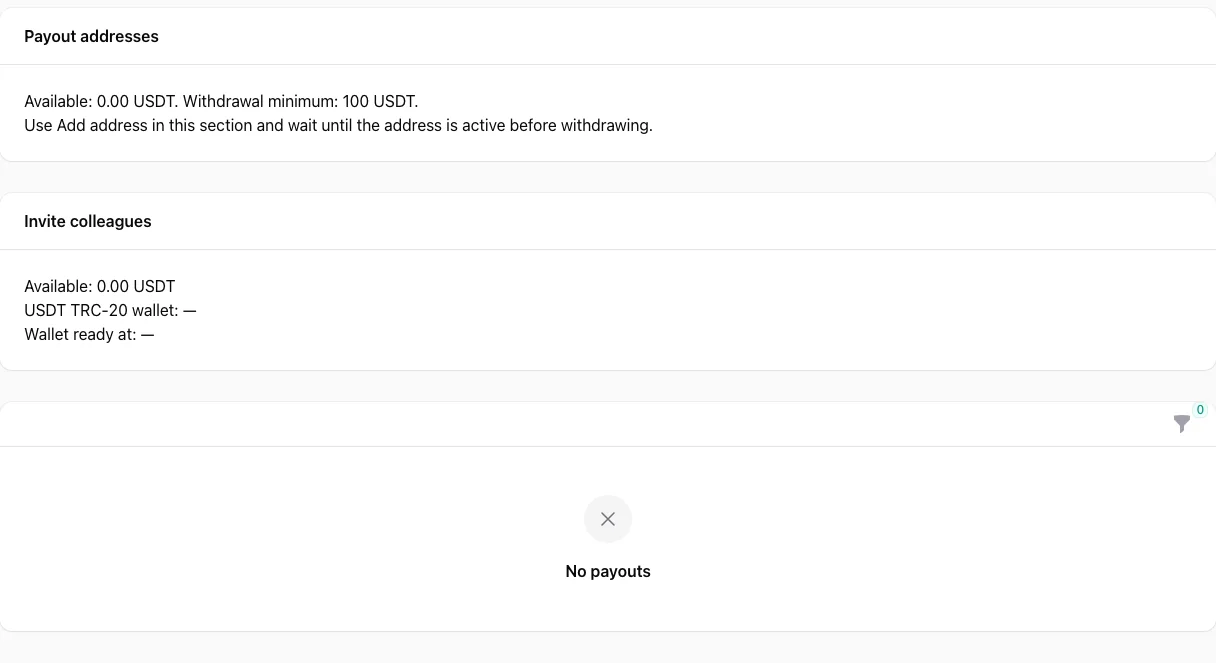
Real DEMO dashboard, 9 October 2026: available balance, minimum, addresses and empty history. Do not add the separate referral block to the ordinary payout balance.
What happens to the balance: an educational example
Available: 250 USDT; reserved: 0. You request 100 USDT. Once accepted, 150 USDT remains available and 100 is reserved. These are the same funds, not additional income. When the payout completes, the reservation closes; without other transactions, 150 remains available. If a confirmed failure releases the reservation, the available balance returns to 250. Do not treat funds as returned until the dashboard reflects this. An unknown result may leave funds reserved until reconciliation.
Request a payout from your available balance. USDT payouts are processed within 1–48 hours of your request, with no additional holding period. The 1–48-hour period starts when you submit the request. After more than 48 hours, contact support with its reference, amount, submission time and status. Do not duplicate the request or share passwords, seed phrases or private keys. Once a conversion is confirmed, earnings are available without an additional holding period. Cancelled conversions may be reversed.
Before confirming
- You have selected the correct role and project: advertiser funding or publisher payout.
- The amount, currency, network and payment terms have been checked.
- No existing transaction has an unresolved result.
- A withdrawal uses available funds and an active address.
- You have retained the reference and confirmation without sharing secrets.
For navigation, see advertiser setup and publisher setup. New users can register as an advertiser or register as a publisher. Registration alone does not create earnings, an available balance or a payable withdrawal.